Turn Documents into Structured Insights with Agent Bricks
Summary
- Document Extraction: Convert unstructured documents like contracts and invoices into structured JSON automatically without manual labeling or schema training.
- Continuous Improvement: Schema feedback and AI-assisted evaluation help the extraction agent improve accuracy over time with minimal manual effort.
- Unified Governance: Extracted data becomes queryable tables in your Databricks Data and AI platform lakehouse, governed like any other asset.
Turn Documents into Structured Insights with Agent Bricks
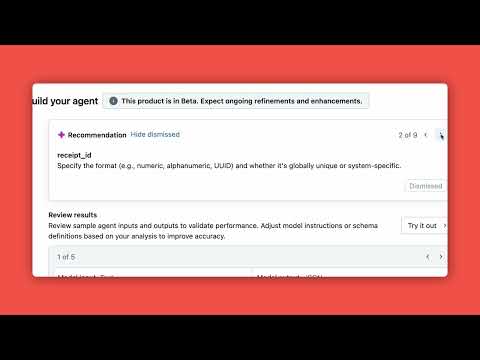
See how Agent Bricks makes it easy to extract structured information from contracts, invoices, or forms—no manual labeling or schema training needed. This demo shows how the Information Extraction agent continuously improves using schema feedback and AI-assisted evaluation, helping you accelerate automation while reducing risk and effort.
Chapters
FAQs
How does information extraction work?
You provide source documents (Delta tables or volumes) and define a JSON schema for the output. Agent Bricks automatically detects and extracts key information like names, dates, and amounts.
Do I need to label data to train the extraction?
No. This video shows that Agent Bricks provides recommendations automatically and learns from schema feedback, eliminating the need for manual labeling or traditional model training.
How does the agent improve extraction quality?
The video demonstrates that Agent Bricks provides intelligent recommendations for improving field definitions. You can also provide feedback on extraction results to continuously refine accuracy.
What document types can be processed?
The demo shows extracting receipt data from various receipt formats. The system can handle PDFs, images, and structured documents—especially with ai_parse_document for PDFs.
Full transcript
0:00 Introduction
A super quick overview of the information extraction agent bricks. So you basically can find agent bricks right here in the left sidebar. And once you click on it, you basically see our two agent bricks tasks, information extraction and model specialization. If I click on information extraction here, uh I can open it up and we can basically see okay this is going to help me convert text documents into structure JSON to detect and classify key information such as names, dates, amounts, etc.
0:30 Information Extraction
And so the first thing that I'm going to do is provide the source document. So if I browse what I have in Unity catalog, I see that I can choose either a delta table or I can choose a volume depending on where my source data lives. And if my source data is actually a PDF or an image, I'd really encourage you to use our AI parse private preview, which is a SQL function that will convert your PDFs and parse the text into a delta table that you can then plug in here in agent bricks.
So let's say I choose a data source. The next thing that I'm going to do is define the JSON schema that I would expect my extracted entities uh to be formatted in. And so once they add that here as a sample output format and the names of the different fields and example um outputs or values of those keys, then what I can do is create the agent. So let's go to an agent that's already created here which is meant to extract receipts uh or receipt data in English um from different receipts in different formats.
1:40 Agent Setup
So the first thing that I'm going to care about here are the global instructions that apply to any extracted element. But then from your schema that you give us, we actually help you by providing a schema definition and autogenerated descriptions for different keys within your schema such as the receipt ID, the receipt category, date, vendor name, etc. So, we'll autogenerate these descriptions for you straight off the bat, but then also take you the next step further to improve your quality by giving you recommendations.
So if I look at the dismissed recommendations, I see here that we provide recommendations on um improving the accuracy of the receipt category by providing a more descriptive uh definition for the different fields. And for the variety of fields that you're trying to extract, we'll give you intelligent recommendations on what we think you can help with to ensure that the outputs extracted are completely accurate to the information you're trying to get from these documents, receipts, images, or PDFs.
Um, and what really matters here is that you can see these improvements at each iteration of updating the agent with the results here of uh the model outputs based off of the descriptions that you've provided and the recommendations that you've taken into account. And so if you flip through these and see that, okay, I think this is accurately extracting the information that I need, you can either update the agent if that's not the case with updated descriptions, or you can go ahead and go to the use page, which is where you can do one of two things with this endpoint that's already generated for you from the get- go.
You can extract the data from it using AI query function or you can get a cheaper agent where we'll basically synthetically generate a label data set and train a smaller cheaper model for you so that you can use it in production at scale more effectively once you hit optimize. So let's say I've already hit optimize. If I go to the review page, what I can see here is a rough estimate of the cost and throughput of your active model versus your optimized model.
4:05 Auto Evaluation
But then I can also use our auto evaluation feature built into agent bricks to see how my active model is doing for example. So the original one that I generated um and then actually compare it to the optimized model here and say hey basically for this cheaper cost am I still getting the quality that I need? Um and where is the optimized model doing better or worse to the active model? So once I'm pretty satisfied with my endpoint, I can then go back to use and then also actually use it uh in batch inference using the AI query SQL function.
And this will help me basically generate outputs with my new specialized model uh for information extraction on high volumes of data super efficiently since AI query is optimized for optimal performance and also accurately since we've really trained a model to effectively extract information on your domain knowledge with the intelligent recommendations, the iterative quality loop and the description generation.
Learn more about the Databricks Data and AI platform.
The information provided herein is for general informational purposes only and may not reflect the most current product capabilities or configurations.