How to Schedule Automated Meeting Prep in Genie One
Summary
- Genie One Integration: Connect to business tools like Google Drive, Google Calendar, and Databricks tables for comprehensive data access.
- Automated Meeting Prep: Schedule Genie One to automatically prepare meeting briefings by reviewing calendars and analyzing relevant customer usage data.
- Workflow Automation: Create scheduled tasks that run in the background, freeing up time for strategic work instead of repetitive analysis.
How to Schedule Automated Meeting Prep in Genie One
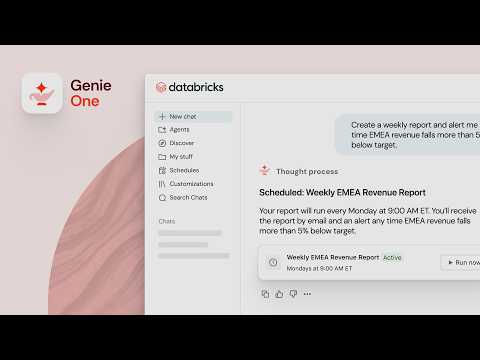
Connect to everyday business tools, review your calendar, and then schedule a weekly meeting prep doc in Genie One.
Learn more about Genie One: https://www.databricks.com/product/genie/one
Chapters:
Chapters
0:00Introduction0:24Connecting data sources1:40Prompting Genie One to review your calendar2:50Reviewing Genie One's prepared analysis3:40Creating a scheduled task to prepare for meetings4:30Reviewing existing scheduled tasks
FAQs
What data sources can Genie One access?
This video shows connecting to Google Drive, Google Calendar, and Databricks tables containing revenue and customer data. Genie One understands context about your organization and can combine these sources.
How can I automate my meeting preparation?
You can tell Genie One to check your calendar, find customer meetings, and prepare analysis by querying relevant usage tables. Genie One then creates this analysis automatically on a schedule.
What data sources can Genie One connect to?
This video demonstrates that Genie One can connect to multiple data sources including Databricks tables (containing business data like revenue), Google Drive for document access, and Google Calendar for scheduling context. Once connected, Genie One understands the combined context and can analyze cross-functional data—for example, querying customer usage tables before meetings to prepare relevant talking points. The ability to integrate personal tools (Google) with enterprise data (Databricks) enables Genie One to provide contextual insights for business workflows without manual data preparation.
Can I schedule recurring tasks in Genie One?
Yes. This video demonstrates creating scheduled tasks that run in the background on your cadence, such as weekly meeting prep, and Genie One manages these automatically.
What kind of analysis can Genie One prepare?
The demo shows Genie One analyzing customer usage patterns and creating insights before meetings. It can query tables, combine data from multiple sources, and surface actionable recommendations.
Full transcript
0:00 Introduction
Hi, I'm a product manager here at Databricks. I'm excited today to walk through Genie 1 and schedule tasks and how it can help users monitor key KPIs and really automate some of their workflows. So, I've got Genie 1 in front of me here. You can see it's this nice simplified UI. And I'm going to just start by connecting in the necessary data sources for uh you know, powering my workflows. So, it's already got data from within Databricks, you know, tables on revenue and things like that for my customers.
0:24 Connecting data sources
But I as also have a couple personal things that I want to connect in. So, I can do that by clicking this plus button here. And I'm going to add in Google Drive. And it's going to take me to a sign-in page here. So, let me go ahead and do that real quick. And we can give it permission to see some of my Google Drive and Google Doc documents. I'm also going to give it permission to my calendar. Let me sign in to my calendar as well.
And this is going to pull some example calendar events that I've had uh scheduled as well. Great. So, now Genie 1 has a lot of additional context about who I am and the things that I care about. Now, I can go ahead and start thinking through some workflows that I might want to add. So, you know, something that I typically have to go through each day, each week is understanding what conversations I'm going to have with customers.
And from there understand, "Hey, what does their usage look like?" Right? Uh that gives me some context heading into those calls so we can have a bit more of a productive discussion. So, I'm going to say, "Hey, uh check my calendar for the rest of the week. See what meetings I have with customers uh and prepare for those meetings with some usage data analysis that could make create interesting insights. Something like that.
1:40 Prompting Genie One to review your calendar
And let's give that a try. So, Genie 1 is going to understand the data with the Databricks and also those data sources that I just added. And from there, we'll start to kind of create a bit of a plan and be able to execute an analysis of, "Hey, what is actually interesting for these customers?" So, you can see here it'll be kind of thinking through different context. It's gone ahead and found my calendar, right? So, there's a meeting with Acme and Stark Industries the next few days.
It also found this table on consumption daily that seems like it has some revenue information. And it's going to query that table to kind of get some results to analyze. So, we'll give this a second to run here. Great. All right, you'll see we've now got some detailed analysis prepared. So, you can see we've got an executive summary. Both of our customers are showing growth, good commitment utilization, good revenue over the last 30 days.
2:50 Reviewing Genie One's prepared analysis
We can see the count overview for Acme and see some other trends. So, we get a visualization here on what's happening. And we get some interesting pieces around hey success, expansion opportunities, and discovery questions that we can ask. Same thing with Stark Industries, right? And we also get like a little heads-up, hey they have a renewal coming up. It kind of has some more details about their usage. Now, this is a really interesting analysis.
But, we we don't want to run this manually every single time we need to. You know, ideally, we could automatically prepare this. So, I can actually come to Genie and I can say, "Hey, create a scheduled task that runs this for my meetings each week." Genie will go ahead and understand kind of the queries that it wrote and then package that in a reproducible prompt that it will then go ahead and start executing every Monday.
3:40 Creating a scheduled task to prepare for meetings
So, I can say, "Hey, Monday morning, 9:00 a. m. Pacific time." And this scheduled task makes it really convenient. I don't have to go and manually prompt things. It's going to do it automatically for me. You'll also be able to see these results on your mobile phone if you have the mobile app. And you can also have this be sent to you as a email, for instance. So, you can get that kind of weekly report delivered right to your inbox. >> instructions to see what exactly it's going to analyze.
4:30 Reviewing existing scheduled tasks
You'll also be able to see the run history, any connectors that have been added, and it gives you that overview. Awesome. So, that's a little bit about how scheduled tasks can help you automate your workflows. We encourage you to really play around with this. I found it super useful in my day-to-day, and I expect that you will as well. Thank you so much for your time. >>
Learn more about the Databricks Data and AI platform.
The information provided herein is for general informational purposes only and may not reflect the most current product capabilities or configurations.