Industrial AI Machine Vision in Action with Databricks & Crosser
Summary
- Edge deployment: YOLO-based models are trained and deployed to resource-constrained edge devices using ONNX format for industrial quality control.
- Automated retraining: Intelligent data pipelines on Databricks support continuous model improvement through automated retraining and monitoring.
- End-to-end MLOps: Databricks' Mosaic AI and Unity Catalog provide full MLOps lifecycle governance for manufacturing quality applications.
Industrial AI Machine Vision in Action with Databricks & Crosser
David Rogers, Senior Solutions Architect at Databricks, and Göran Appelquist, CTO at Crosser, provide an expert session exploring how Databricks’ MLOps capabilities and Crosser’s edge analytics and orchestration come together to solve real-world manufacturing quality challenges using event-driven machine vision.
Learn how to:
- Seamlessly train and deploy YOLO-based models to resource-constrained edge devices with ONNX
- Build intelligent data pipelines that support automated retraining
- Govern and monitor the full MLOps lifecycle with Databricks’ Mosaic AI and Unity Catalog
Chapters
0:00Introduction to Webinar1:09Industrial AI challenges5:06Cloud MLOps with Databricks10:03Monitoring and governance12:31Crosser edge platform14:41Edge orchestration17:05Databricks demo26:11Crosser demo37:25Q&A and next steps
FAQs
How do YOLO models improve manufacturing quality?
YOLO (You Only Look Once) models enable real-time visual inspection to detect defects and quality issues. This video demonstrates training and deployment on edge devices.
What is ONNX and why is it used?
ONNX (Open Neural Network Exchange) is a portable format that enables models to run on diverse hardware including resource-constrained edge devices. This video explains deployment advantages.
Can AI agents build machine learning models end-to-end?
This video demonstrates how AI agents on the Databricks Data and AI platform can automate ML model building from data preparation through deployment. Agent-driven ML reduces expert bottlenecks enabling broader adoption. The video shows agents handling routine tasks while humans focus on complex decisions.
Which ML platforms support the complete lifecycle?
This video shows that the Databricks Data and AI platform provides end-to-end ML capabilities from data preparation through monitoring and governance. Complete platform coverage eliminates tool-chaining complexity. The integrated approach improves efficiency and model quality.
How can I use natural language to build ML models?
This video demonstrates using Genie and natural language on the Databricks Data and AI platform to guide ML model development without code. Conversational interfaces democratize ML making it accessible to non-experts. The platform translates natural language intent into executable model building.
Full transcript
0:00 Introduction to Webinar
Welcome in uh to our webinar on industrial AI in action. Um I'm here with our friends over at Crosser and we're going to take you through an end to end uh workflow for event-driven machine vision. I'm joined on the data brick side by who will be monitoring the chat. So if you have questions as we go through the presentation, feel free to put them in the chat and will get to them. U we will have an open Q&A at the end of uh the session here today.
Uh, but I'm your host, uh. I'll be leading you through. I lead our industrial industry solutions here at Data Bricks and I'm joined by. Uh, you want to introduce yourself? >> Yeah, sure. So, I'm the CTO at Crosser based out of Stockholm, Sweden. I will take care of uh the Crosser parts of this uh journey today. >> Excellent. So, with that, let's let's get into it. uh some of the uh kind of key challenges kind of starting off why why is this something that uh people are are struggling to deploy machine vision at scale um the first part we're going to kind of cover today is all around training and deployment this MLOps this life cycle of managing machine learning models that can be deployed in an industrial environment uh securely um can do it at uh you know with restricted environments monitor how the models perform forming so that you get the uh resiliency and the deterministic nature that you expect when you're doing uh quality applications or um process monitoring of your manufacturing process.
1:09 Industrial AI challenges
So all of these things as we as you kind of go into the machine learning and AI world, uh being able to understand how the model's performing so that you know that the product you're producing in your manufacturing process is of good quality and you you have no defects and no escapes or if you do have some you can trace through and figure out what the root cause is because you're able to detect them uh through uh techniques like machine vision.
So that's one of the kind of key things I'll I'll highlight here on the data brick side. Uh Yan, you want to talk through the edge side and the edge orchestration problems that you're seeing uh over uh that you solve with crosser? >> Uh yeah, so there are a couple of things you need to take care of. I mean first thing is to get uh the actual model into a distributed environment which could be um protected by firewalls and other things and that's the first challenge.
Then we need to get access to data. I mean we we need data from real devices. Um, so we need access to that data and then eventually we want to use the result of that model to take some actions as uh exemplified. You may want to just remove faults, sorry, parts that are detected as faulty or depending on on the type of use cases, you might want to stop a machine to prevent further damage and so forth. So different actions or maybe just inform someone, show a picture locally to an operator so that they can make a decision and so forth.
So there's a lot of interactivity with the local environment required uh for this in addition to preparing the data. I mean it's not just enough to connect into this local environment. You need typically to do some kind of preparation of the data before it can be used uh in in a model like this. Now with vision it might be a bit more straightforward but with other use cases you you may need more preparation of data before it can be used in a proper way with these type of models.
So that's what we're going to talk about today. >> Excellent. And the way we're going to bring it to life uh for you all. So we're going to certainly talk about the data bricks and crosser technologies. Um we're also using a model type called YOLO. You you only look once um that has gained prominence in uh industrial machine vision uh for a variety of reasons. Uh one is that it's very uh computationally efficient to run the inference.
Uh so that's going to be uh critical. Uh so you can kind of see that on the chart that's a little covered there. And then uh we're we're also going to have the model in NX open neural network exchange format. Uh so that it can be interoperable with uh no matter what kind of hardware or edge compute you have, you're able to run it and it's able to um access that hardware and be interoperable wherever you need to deploy it.
So in heterogeneous hardware environments, you're able to have one model that you're able to deploy um anywhere across your your factory network. So those are some of the core elements we're going to bring to life in this uh demo. Uh but uh to start here, we're going to kind of take you through the endtoend kind of capabilities within the two platforms and how you uh drive this entire life cycle from training the models to uh controlling where they get deployed, monitoring them and then executing at the edge and then feeding data back into the cloud to retrain, update and uh do the endtoend uh model life cycle.
So, we'll take you through this step by step here today uh before we get into the demo and actually show you end to end. So, first first off, we're going to kind of talk through uh data bricks. What's going on in data bricks land? Uh why do you need the cloud layer and data bricks specifically to address this problem? Well, first off, you need uh MLOps. in this uh MLOps for those maybe coming from an OT background or manufacturing engineering background.
5:06 Cloud MLOps with Databricks
Um it's really the set of processes that enables you to create and manage uh the machine learning model that you're deploying within the manufacturing environment. So you want to you want to be able to govern it. It it takes some code um that your IT team uh uh understands and can build. It takes um data as mentioned the data is so critical to training these machine learning models and then actually building the model itself managing the model understanding how it's performing all of those capabilities are things that you need to be able to have a handle on and then you also need to be able to govern this uh through its life cycle.
So you need to know what the state of that model is. Um who can use it? What uh factory what production processes is it deployed in? Understanding the context in which it's deployed. so that you're not just uh you know putting a model out into production and then nobody knows how to actually improve it or take it out of production if it's not performing correctly and swapping in uh maybe a backup or a B version that can uh maybe do some other detections that are uh maybe less sophisticated but more reliable and so you're able to think through those trade-offs and the way you orchestrate that is through this MLOps uh process.
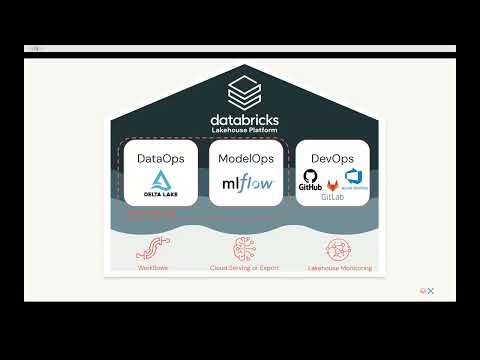
So on the data bricks platform we bring this to life uh kind of this data ops model ops devops through kind of three sets of tooling uh data ops you have delta lake so the a file format that allows you to scale very efficiently in in the cloud and manage and have transactional um data uh of all your images in machine vision land but it can be tables um it can be other data artifacts that you want to transactionally be able to understand their history where they came from what process process they came from and manage that through its life cycle.
We have ML flow which is a an open source delta lake is also open- source uh way of managing uh artifacts uh within the machine learning uh training and management and then devops actually managing the code that's building the machine learning model. So we we bring this to life in data bricks through workflows um our cloud serving or in this case export uh so that crosser and technologies can pick it up and bring it to the edge and then lakehouse monitoring to monitor the models and code uh through its life cycle and then all of this is governed through our governance framework called unity catalog.
So I'm going to actually skip through this one. Um there's things around you want mlops for managing risk but it's really about this life cycle management. So, you want to make sure that as your your manufacturing process, right, it's not static. It's changing. You're updating it. You're maybe retooling it. You may be rerouting things. You may be upgrading equipment, uh, changing out equipment or equipment failed and you replaced it.
All of these things may cause the the data that's being captured in the manufacturing process to change and drift. And so, you need to account for that when you're dealing with machine learning. You can't just um say, "Hey, we're going to train this machine learning model once." Oh, yeah. It's just machine vision. We have this camera and it's always going to perform the same. The result is there's a dynamic thing that is that is changing in in the physical world and you need to be able to handle that to intelligently retrain the model as the manufacturing process changes with it.
Um so then that way the model's always up to date. it's performing the way you expect to capture defects before they become escapes and then you're able to respond and figure out root cause to anything that may be causing defects faster. So that's this whole kind of concept of model and code life cycles that you it can be very very challenging to try and manage this all in the OT environment. Doing this in the cloud environment and the IT environment is going to give you the tooling you need to do it successfully.
That's the key takeaway for this aspect. And then there's the governance aspect of it of understanding um access to these models, auditing how they're being used, the lineage of what data came in from which facility on which line um joined with which uh maybe product information about how it how it should look, how it's designed, comparing, you know, actual in the manufacturing process versus as designed. uh and being able to discover what's available, what models uh can I use to actually uh deploy on the edge.
All of these things are the things that uh you're able to solve for with our governance layer of uni catalog. And then this this brings that model life cycle with the governance to life. So there's a lot of details here that I want to make you aware of as part of this uh conversation, but as you go into um really building out your industrial AI ecosystem on data bricks, um please reach to your data bricks account team, help guide you through how to do this because there's there's different skill sets when it it comes from the machine learning engineers to the process and manufacturing engineers that are dealing with the problems in real time.
10:03 Monitoring and governance
And so being able to understand these concepts and tailor them towards what makes sense for you all is something that our account teams can help you with um design that uh that end to end life cycle for your industrial AI applications. And then last thing here before I turn over to is all about the monitoring. So this is another kind of deeper discussion of understanding how this data is is drifting. So, how the manufacturing process, how the camera gets dirty or it starts performing poorly for whatever reason, uh maybe the resolution isn't as good as you need uh for certain uh defect detections.
Uh being able to actually understand that and quantify what that means in terms of the uh impact on the machine learn model. Um that is something that lakehouse monitoring within data bricks will help you understand so you can get ahead of oh we do need to retrain this model now and redeploy it because the data has drifted so much or maybe we we added a new product onto the manufacturing line and now we need uh the machine learning model hasn't seen it before so we need to retrain it and lakehouse monitoring can help you understand that so if your OT um makes changes and maybe they didn't get word all the way to the IT team um your IT is able to actually detect it uh through this lakeoff monitoring before OT even tells them and the process engineers even tell them that they they updated it.
You can see these type of things in real time through the data itself rather than waiting for a reaction to oh it's not you know it's no longer working. What's happening? Uh you're able to see it through the data and intelligently retrain and deploy back to the edge without even the manufacturing personnel maybe even even noticing. So with that, I'll I'll I'll uh turn over to kind of take through how how Crosser can um take the models that are trained in in data bricks and bring them into uh the edge.
So Yorn, just just tell me when you want to move on to the next slide here. >> Yeah, thanks. Um yes, so starting with a quick intro to Crosser so we get some context here. So the crosser is a a platform for um designing and deploying uh use cases to run wherever. It's designed for specifically for hybrid deployments. So that's why it's a very nice fit with these type of use cases. And we've done that by separating the design and management layer which we call the control center from the actual execution environment which we call uh the crosser nodes.
12:31 Crosser edge platform
Um so that you can design a use case uh centrally in in a cloud service and then from when you have built something that you're happy with you then decide where you want that to execute and that can then be anywhere where you decide depending on where you deploy these these uh nodes and if you go to the next slide. So if we start with designing use cases, you do that in the control center and we have adopted a low code approach to make it as easy as possible to build these kind of use cases.
So we provide a library of pre-built modules that you can combine together into processing flows like the one you see on this slide uh for a specific use case. When it comes to machine learning models and es specifically these uh vision type models, we typically use um some Python code to wrap them or adapt them for this local environment, but you always have full access to a standard Python environment from within these these flows.
You can combine fixed function modules that we provide with some dedicated Python code that you need for a specific use case like we will see um in the demo shortly. But this is where you start. Then you can also test these use cases from the this central tool. And when you're happy with what it's doing, you then decide where you want to uh execute this this um uh this use case or this flow as we call it. So we can go to the next slide.
So for execution we use this environment we call the crosser node which is it's a single docker container that you can install anywhere on your infrastructure where it makes sense. could be next to a machine. It could be in your local data center or even in your cloud environment if that makes sense for for some use cases. But the key thing here is that it's a very lightweight container. The whole thing is around 300 megabytes in size meaning that you can run it also on very small devices uh sitting very close to where you have your data.
14:41 Edge orchestration
Um and also the whole idea with these runtimes is that they are generic. It's something that you install once and then when it's installed from there on you manage everything from the cloud service. So each of these nodes can execute any use case that you build in the cloud service without having to touch these local environments. So once installed you don't need to touch these to install a new use case or update an existing use case.
You can run multiple use cases on each of these nodes and when you do that they run independent of each other. So you can update one without affecting other use cases you have running on the same on the same uh node. The actual uh runtime engine that we use to execute these flows is built on the. NET platform. Um and as you might be aware Python is not the native language innet. So in order to support these kind of Python use cases, we also bundle a standard Python environment within our container.
So you always have access to that uh when you build these these flows. Also another thing is that all these modules that or building blocks that you use when creating these use cases they are hosted in the control center centrally and whenever you deploy a flow all the modules that you use in that flow will be downloaded dynamically into this local execution environment. to these nodes. They don't know anything about modules or or Python or whatever.
Uh well yeah Python they know some about but still um everything that you that you use in your flows will be downloaded whenever you decide to deploy a flow which means that whenever we introduce new modules in our library they can immediately be used in new use cases on any of the nodes that you have already installed in your infrastructure without making any changes to that local um infrastructure which simplifies the life cycle a lot with these um these different use cases.
So that's basically the crosser environment and then in the demo I will show you a small example where we uh take the output from the data bricks environment and bring it into um an edge environment for local execution. So back to you. >> Excellent. Thank you. Yeah. So end to end here, we're going to walk through this now in a demo, but you you'll see kind of each one of these elements. And again, as you if you have questions, feel free to ask them in the chat and uh will we'll get to them.
17:05 Databricks demo
So with that, let's let's get into the demo here. Um so I'm going to walk over here into um a uh our the data bricks platform here. So you can see um in this case I'm showing you a notebook. I'll show you a couple ways you can do this in a in a lower code kind of uh way. Uh but to start I wanted to show you kind of the the endtoend pipeline what it what it truly looks like. Um you know fully fully transparent on on how you do this starting with industrial op optical inspection data set.
So this is something that you can see um here. It's it's published way back in the kind of early days of industrial AI um from the H Highleberg collaboratory for image processing. Basically, there's a bunch of texture images. I'll show you what those look like here in a second. So, I'm bringing this data in and I'm bringing it into Unity catalog. So, that's again the governance framework where you're storing data within data bricks.
This is actually just sitting in a object storage bucket in the cloud. So, this is going to be S3 ADLS or Google cloud storage. Um, and all this data is just uh with a uni catalog volume. Think of it as a file system. So, it's just governing these these files and I'm organizing in a way that makes it easy for me to train the machine learning model. So, this image, what does it look like? It's it's uh basically you can think of this as like a film or a texture on a composite or a um a metal u but it's just a synthetically generated image.
If you look really closely here, I don't know if you can see my cursor, but there's a there's kind of a defect in there. We'll we'll show you what that label looks like in a second. Um, but these are the images. So, in this case, it's it's grayscale. You may actually have color. Uh, Sandep you're drawing on the screen, which is okay. Uh, but uh um you may have color images. It's going to work just fine if you have color.
It's just a different um thing that you want to think about the trade-off in the inference um depending on how uh the velocity of your uh production line is. So in like film manufacturing or paper manufacturing, it may be really high velocity. And so uh you may want to be able to run this in a in a kind of grayscale manner that's going to allow you to lower the bit rate and um get you uh to do inferences much faster.
So some things to think about. Again, we can help you think through those tradeoffs uh when you're designing machine learning models for machine vision. Uh but for now, these are we're using Grayscale here. Um verifying these labels um and writing them to uh Uni Catalog here. I'm actually putting these I'll show you the data here in in um Uni Catalog here in a second. But the labels actually came in as ovals. Um if you've done any object detection with YOLO, you'll know that it's a bounding box.
So the next thing I do here in my in my pipeline is actually create this as a bounding box. So I I translate these into a bounding box. And so you can see here instead of that oval I'm now creating a bounding box over the uh defect uh so that we know exactly where it is and a nice green color here so it stands out. Um so that's way you want to prepare your data. If these labeling is a key part of machine vision there's a number of different ways you can label things. uh we have things within data bicks and partners that can help you go through that labeling uh workflow.
That's for another uh kind of discussion, but please reach to your data bicks account team to help guide you through um the options you have for for data labeling uh with data bricks. You can see here so we we label this we did this across the thousand or so pictures that are in the class one kind of data sets within this um this data set that we pulled from. Um, and all of this data is is in uh Uni Catalog. So, you can see here we go on data sets.
We'll go into kind of my folder. We can go to the images in here. Uh, we broke them out into train and test sets. Um, in here, here's what the images look like. So, these are exactly the images that are being stored uh within the platform. And then we can actually go into the catalog here. And what I did was I I created a a Delta Lake table that describes all of the images. So there's sample data here. You can see exactly where the ID is if it's the label is defect or not defect.
Maybe you have different types of defects. Maybe you have uh prints, you have uh tears, you have all different things that you may have. So you can actually label these as um those different categories of defects and YOLO will be able to tell you which category it is. In this case, I kept it really simple. Is it a defect or is it not? So one or zero, zero being non-deect defective and one being defective. Um and then where where are these actual uh files located on the file system so that when I go to train the model, it's able to pick up the files uh or pick up the images to train the machine learning model.
So in here the next thing is actually training uh the YOLO model. Um and in this case I'm using a library from Ultralytics. If I was to do this um in uh production I would want to own the end to end IP. So I would actually train this from scratch. In this case I I kind of took the we'll say the easy button approach uh that uh Ultralytux provides um to help support this. And then I'm able to run a uh detection here. So I'm I'm actually just doing an inference against uh one of the training images, but you can see it's it detected one defect there and 8.
2 milliseconds. So if you think about your um operating environment, 8. 2 milliseconds may be uh sufficient uh to do that inference, but maybe your your your speed is so fast that you need it to be um faster. And so you can quantize this model. You can uh make it so that it maybe uh trades off inference speed with precision and accuracy. Um all these different things that you'll want to be able to control. You can do that very easily here in the data bricks environment.
So this is something you want to think about. Um in this case I just exported it to ONX. I know my camera in the industrial environment is giving me 512 x 512 images. So I'm exporting it for that image size. And then I am putting that final export directly into my uni catalog here so that um crosser can pick it up. So in here if we go into uh where' I put this uh manufacturing um actually let me go into the catalog explorer here and we go to our machine vision folder.
I'm just kidding. If I go into my uh models folder I moved it here. Here's my ONX model that is the output of that notebook. that code that I just showed you. And so in here is where there's APIs into here that Crosser can hook into to access this. So this is the Oninx format. There's um things on the ONX runtime. ai website that describes how to how to use Oninx, how to load this in, how to how to format it. So um it's an open standard something you can borrow from the community on how to use um and be able to understand kind of the format and how to load it in.
It can be tricky. Um we're here to make it easy. Just want to show you the end to end all of this code. And as I train that model all of the artifacts are in this ML flow that I mentioned earlier. So we can we can take a look here at the uh performance of it. We can take a look at uh the validation. So validation batch we can see which ones if I click this here we can look in we can see that it was able to detect defects in these images these other ones didn't have defects be able to understand the horistics of this so that's what the confusion matrix is all about oops um so in here you can see it actually sometimes it double detected and actually picked up background but that's okay as long as you know there's the proper defect in there you probably just don't want false positives right you don't want take u good product and off the line and that the model is saying is defective when it's really not.
So you want to, you know, make sure you have true positives um that are picked up. And so you can look at all the artifacts in here. It's all in one place. So as you go through that retraining um life cycle um you want to make sure you're maintaining the efficacy and the performance of that model. Um, so you have that confidence when you bring it back down to the manufacturing environment, it's going to perform the way you expect.
So with that, um, I'll turn it over to walk us through the crosser platform. Again, the models here in a uni catalog volume um, you would use a data bricks API to, uh, pick this up. If you want the ML uh, ML ops life cycle, we have a whole book on how you how you orchestrate this at scale. Uh but uh from here I'll turn it over to take us through um the crosser side. , over to you. >> Yeah, thanks. Let's see if I can share my screen.
26:11 Crosser demo
Okay. Okay. So I jumped straight into the uh design tool in our control center. And here I built a small sample application just to show how we can use uh use this um this model. But before getting into here, I imported the model that just uh showed. And uh once it's imported into this tool, I can then reference that when I'm building this use case. I referenced it here. I actually renamed it. So it's it's no longer best x, but anyway, it's the same file that uh that came out of u uh sequence of operations in in data bricks.
So this is the model file. So I just add it here so that uh we know that this is going to be used by this use case. I also created a small um Python script with some utility functions to wrap this model um to make it useful in this this environment. We will see how that is used um in a second. So the these are just additional data that is um if I can move this um going to be used by this um this tool. So whenever we deploy this uh this use case into one of these nodes, the node that receives it will see that it also needs to download these two additional files into local storage because they will be needed by this use case.
So once configured, we don't need to worry about that and we can deploy it anywhere and it will be managed automatically. So let's take a look at this uh this example. Now we don't have a real camera here that we can use for the demo. We're uh baking it a bit by just uh using a couple of the um the files uh the image files that show you. So I've just uploaded those into local storage. So this first part here sort of simulates the data source by just uh picking up all the JPEG files that it finds in a folder and then sending them out one by one at the end here.
So in a real use case, this would be replaced by a camera or maybe a watch folder where we pick up image files that are put there by some other uh device that you have. Uh it's not really relevant. The key thing here is that as some somehow at the output we will get image files coming out. So these will be JPEG images and that is what we use as input into the next module here in the flow which is our Python module where the ML model is used and I will come back to that one in a second.
Let's first go through the whole sequence here. So we send these images into the model and then out of the model comes two things. uh one is a score um and the Jolola model can actually detect multiple anomalies in each uh image but in this case we're just keeping the highest score uh that it found in the image. So that score will come out as the output and there will also be uh an image file in the output and that is a copy of the input image but with the bounding box around the uh detected anomaly added onto the image.
So just like the images you saw on the data brick side that is created locally here for each um image that has anomalies. So that is what we get as output and then we just add a threshold here to check uh the score. We we just want to do something when the score is high enough which indicates that we have an anomaly. So we set a limit here to uh check if the score is higher than 04 which seem to be uh reasonable in this case.
Uh if it's lower than that then we don't do anything. and we just drop the data. But if it's above this threshold, then we take some actions. And then I just added some examples here. You can do lots of different things here, of course. But first, we just created a um a text message where we insert the name of the image and the score. And then we send that to a team's channel to notify someone that we found an anomaly.
Could maybe be useful. Uh but we could also take an action and write data back to the machine. Maybe we want to say that uh this part with this ID is uh faulty. You should remove it from the production line. So we don't spend time on that one. Or if it's depending on the use case as I mentioned before, it could also be that you you've seen that something has happened that you may want to stop the machine so you don't destroy stuff even further or whatever it might be.
But the key thing is that we can communicate directly back to the machines uh and take actions um on the machine level based on the output of these models. And then the second part here is just to use the image that we get as output. Maybe we want to show that image to a local operator so that they can take a look and make the final decision. So just uh to exemplify that I dump it on our internal MQTT broker so that we could connect for example an HMI device uh that the operator can use to take a look at the pictures and see what did they do with it.
But these are just examples of the actions that you can take based on the result of the model. So let's take a quick look at the uh inside of this um Python model. What do we do to run this this model? First of all, I have listed some um additional libraries that we need in order to do this. Uh so we we use the numpy library for some data manipulation. We use the onnx runtime library which is uh the environment to execute the model.
Remember that we got the model as an ONX file and that is then used into this runtime. This runtime is available in in other environments as well. So you can use it in uh in natively in the net environment if you want. Uh but here I'm using it inside Python. But it's a very efficient um runtime environment for that fits perfectly into these kind of restricted edge environment where you may not have a a full-blown server with a lot of power to run these models.
We also use the OpenCV library to do some image manipulation to prepare the images before they can be sent uh to the model. So I just list them here and the purpose of that is that any node that will receive this flow or where we deploy this flow will then notify this and see that it first needs to install these additional libraries into its local Python environment before it can start to execute this flow. So this is again to make these flows self-contained.
So once configured you can deploy them anywhere without having to know anything about the local environment. Any node should be able to run this flow without further configuration. So that's the setup and then we have a small piece of Python code here um where we import these libraries we import this utility function that we created and then we um reference the model file which is when we deploy this flow as I said that model file will be downloaded into local storage and it then ends up in in this location.
Uh so we just specify that and then we have small two small functions here. Initialize which is called once when this flow starts and we use that to enable this ONX runtime by loading the um the model file into that so that we get um um a runtime environment that we can use to send these images to and we store that in a global variable so that we can reuse it. And then the second function here is called whenever we get the new image at the input of this module.
So then we call this function and the input will contain the JPEG image that we read from local disk. Now there is a small detail here that may confuse you but since as you saw on the slides the Python environment is running outside of ofNET which is our main execution environment we need to translate data when we communicate between these two environments and we use JSON serialization to do that and in JSON there is no binary data type.
So in order to send the image which is binary data uh we have to B 64 encode it before it's being sent to Python. So when we receive it here, it's actually B 64 encoder. So we we just strip that B 64 encoding um and then we use um OpenCV to decode the JPEG image into a format that we can use with the model. So these two lines are just to create the image um data set that we can use as input to the model and then we call uh the model with that image as input and we get back a result and as I said before that result will contain two parts a score and an image with a bounding box.
Now because of that uh use case further down where I created a message we also want to know the name of the file that uh where this data ca came from. So I copy that from the input to this module and add it to the output so that we can use that in the next module. This could have been some other information like a product ID or whatever that you can use to reference back to the source of this data. And then we send this result as the output of this uh module.
So that will then come out if I close down all these will come out here and that is what we use in the next steps in in this um sample flow. So this is just a simple example but it still covers the whole chain from data source or image data sources through the machine learning model and then taking some actions based on that data. When we have built something like this we can also test it within this environment um or sorry uh was on the wrong tab.
Um and when we do that we can use any of these nodes that we have in our setup so that we can actually test run it in that local environment where it's supposed to run. So these are different nodes that I have in this demo environment. So we can use one of these uh to test this flow. Uh and when we test the flow we can check the output of any of these modules. We can track the data through uh this flow. Now I enable debugging on this module here.
And the reason for that is that I use that module to remove the image data because otherwise we will just see a lot of B 64 uh data which is not really important. So I remove that. So we can just take a look at the interesting part. But we could check the data in any step here to make sure that it's doing what we expect. So if I start this flow, what will happen now is that we will download what you see on the screen into that selected node and it will then start to execute.
And we just have a handful of images in in um this local storage and three of them have anomalies. And that's what we see here. Three outputs, one per image with the name of the file, a message that we created in this module and the score that we got from the machine learning model. So that's the uh the final output. Now I can't really uh in this tool show you the images, but I actually uh brought that up. I store it on on my disk here.
37:25 Q&A and next steps
So I can show it. So this is the same type of image that you saw in in the data bricks tool. But this is now coming out of the model. So we just added this um bounding box and the score to the image. So these are available as well if you want to use it inside the flow. So let's say that we're happy with this. It seems to do what we expect and we then want to uh use this in these local environments. So then the final step is to open up our deployment tool where you again get a list of all your nodes.
And here you can select where you want this flow to execute. And I can select the one that I used for testing. But you can also replicate it to multiple nodes. If you want to have the same use case across uh multiple locations, let's say you have three machines of the same type and you want to apply the same use case on all of them, then you can just select them here and then press deploy. And then this flow will be installed into those nodes and from there on they will run atom uh in in those local environments independent of this um control center tool.
Um so they will continue to run in in those local environments until you decide to remove them or up maybe update them with um an enhanced version of this flow with additional features or whatever you want to do. So that's the basic workflow to bring uh these models into an edge environment. Then a typical use case when or scenario when you have this type of use case as as mentioned is that you want may want to update the model because you have made improvements to the model or you have it covers different use cases or maybe other changes that you have made. you want to use another model file and if you want to do that you don't really need to change this flow that you have running these flows are parameterized or parameterizable I should say um so we can make this model file that we use here um just a parameter where which you can change so that it points to another model file so if we get the new version of the model from datab bricks you can bring it in and then just change that reference and then you can restart the flow uh with a new model file without having to touch this uh this design here.
Otherwise, everything is version control. So, you can also create a new version of the whole flow if you want. But if you just want to change the model, then um you don't need to do that. You can just reference another model file and use the same flow um again with that with that model file. So, I'll stop I'll stop there. There are more tools. I mean, once you've deployed it, you you of course you also want to make sure that it's running as you expect.
There's also a monitoring part of this tool that you can use to track uh the flows that you have and so forth, but we don't really have time for that in this u short session, but just get back to us if you want to get more input on how to do these kind of things. So, I'll stop there and hand over to you again. >> Excellent. All right. So, with that, uh we'll open up uh to the audience here for any questions. I think uh that was excellent uh presentation uh from uh the crosser team here and Yuron.
So um Yuron, any uh other final words on on getting in contact with Crosser to help bring this to life on on the edge side? >> Yeah, I mean there are multiple ways uh you can always reach out of course uh through email or our website. Uh we also have free trials that you can sign up for if you want to play around yourself. Uh there's free online training that can help you get started and we also run dedicated uh demos of the cross solution every Wednesday.
Uh so actually in 15 minutes there will be uh a live demo of our uh solution where you can get more information. >> Excellent. And likewise on the data bricks side um there's ways you get if you're not using data bricks today there's data bricks community you can get started quick uh quickly with um you should have data bricks uh within your enterprise our account uh teams will reach out to you if you're interested in in moving forward um so all of these things are available to you have a lot of materials that help walk you through this architecture center there's a blog post uh jointly crosser and data bricks uh put out back in April uh from Yoran myself and.
So, there's lots of ways to help you kind of find success here in deploying this type of workflow. And thank you for your time. I really appreciate uh your attendance here and really looking forward to working with you all um help deploy your industrial AI workflows.
Learn more about the Databricks Data and AI platform.
The information provided herein is for general informational purposes only and may not reflect the most current product capabilities or configurations.