Demo: Building a Governed AI Agent with Unity AI Gateway
Summary
- Guardrail Policies: Unity AI Gateway enforces guardrails to block PII, unsafe content, and policy violations across all agent interactions automatically.
- Cost Control and Tracking: Set cost budgets by workspace or user with options to alert or hard-block overspending, enabling financial governance of AI systems.
- Production-Ready Automation: Convert agents to recurring automated jobs with full governance inheritance, enabling autonomous workflows while maintaining security and cost controls.
Demo: Building a Governed AI Agent with Unity AI Gateway
See what real AI agent governance looks like in production, not just theory. Watch the full session → https://www.databricks.com/resources/webinar/agents-work-shipping-agentic-apps-scale
Amber Roberts (Databricks) builds and extends a real AI agent live: connecting it to business data through Agent Bricks and MCP servers, adding capabilities on the fly with Omnigent and Codex, and tracing every tool call in MLflow. Then she shows where the governance actually lives — guardrail policies to block PII or unsafe content, custom LLM-as-judge classifiers, and cost budgets scoped by workspace or user, with the option to alert or hard-block. She closes by turning the one-off agent into a recurring automated job without losing any of that governance.
Explore Agent Bricks → https://www.databricks.com/product/artificial-intelligence/agent-bricks
Explore Unity AI Gateway → https://www.databricks.com/product/artificial-intelligence/unity-gateway
Full session → https://www.databricks.com/resources/webinar/agents-work-shipping-agentic-apps-scale
#AIAgents #AgentBricks #UnityAIGateway #Databricks #AIOrchestration #MLflow #EnterpriseAI
Chapters
0:00Introduction to agent demo0:22Agent architecture overview1:48Initial agent interactions3:48Debugging and redeploying6:28Verifying agent performance8:07Planning repeatable workflows9:17Automating agent tasks10:14Governing AI capabilities13:06Demo summary and recap
FAQs
What is Unity AI Gateway?
Unity AI Gateway is Databricks' governance platform for AI agents that enforces guardrail policies, custom classifiers, cost budgets, and compliance rules across all agent interactions in production.
How does governance prevent security issues?
Guardrail policies automatically block attempts to expose PII or unsafe content, while custom LLM-as-judge classifiers can enforce domain-specific policies and compliance requirements.
How do cost controls work?
You set cost budgets scoped by workspace or user, with the option to alert teams when approaching limits or hard-block calls that exceed the budget.
Can you automate agent tasks while maintaining governance?
Yes. Agents can be converted to recurring automated jobs, and all governance controls from Unity AI Gateway automatically apply to the automated workflows.
Full transcript
0:00 Introduction to agent demo
Hi everyone. I'm on the tech marketing team here at Databricks. As a lot of you are aware, last month was our Data and AI Summit, Databricks' largest event of the year, and we released a lot of great capabilities around building and maintaining AI systems. So, I wanted to walk you through some of those today. So, let's get started. All right. Now, before we dive into the demo, I just want to walk you through a brief agent architecture slide to Boba Bricks is a bubblesy and I'm the regional manager of Boba Bricks.
0:22 Agent architecture overview
So, I created a store operations agent to help me with the day-to-day task and operations. I already have some capabilities added to it. I have a genie agent to help with store operations. I have a store time MCP server. That's This is a custom MCP server for labor and scheduling. Another custom MCP server is our Ops task for a ticket and task tracking. And then I also linked our Confluence page. We have lake-based memory, both long-term and short-term powering this application, and we'll be showing a variety of platform services throughout this model as well.
So, I'll be using agent bricks, the agent development platform powered with governance through Unity AI Gateway. We'll be recording traces in MLflow. And like I said, this app is deployed using Databricks apps. And the authoring tooling I'm using to build this custom agent is the OpenAI agents SDK along with Codex and the Databricks meta harness, which is Omnigent. If you want to know where I got the template to build this demo, it's just our Databricks app templates where you can choose from a variety of different authoring frameworks.
So, just being able to select your favorite agent authoring framework. All right. Now, I'm in Databricks and I'm going to go to where apps now live, which is on a separate page. Going to click my Bob's Brick Store Ops demo. And I'm going to start with what tools do you have? I saved questions on the side so I don't have to keep copy and pasting them. And here we can see we have access to our Genie space, um our Store Time MCP server, and our Ops task.
1:48 Initial agent interactions
Next, I'm going to ask to show average versus actual training hours for my Pacific stores and flag any stores that are falling behind. Here we can see it querying the Genie space. And I can click into these cells to see the parameters and the results. Okay, and it looks like there's only one store that's majorly behind, and that's store 104 Seattle Pike Place. Next, I want to ask why is store 104 behind on training? And now in addition to the Genie space, it's also calling the Store Time MCP server.
And it looks like it's falling behind because it did schedule those training hours, but due to high demand, it then converted to rush window service coverage, meaning that it was just too busy and they couldn't complete the training. So next, what I really want to know is how does this affect our FY26 training goals? Where does store 104 stack up? Because could they be a little bit behind and still meet their goals, or do I have to do something to help them make their goals?
Okay, and I can immediately see that no tool was called. Long story short, it doesn't have the information that it needs to be able to properly answer this question. It just knows that it's behind. Next, I'm going to open my managed Omnigent. And you can access Omniscient through your terminal, through a desktop application, through a locally deployed application, uh whatever you're most comfortable with. And in this new session, I'm going to be using my local environment.
3:48 Debugging and redeploying
You can use a sandbox environment. You can use whichever tooling you would like. Right now, I'm going to be using Codex, but you can use Cloud Code. And I'm going to turn on this intelligent model router. I'm going to turn this on because when I'm doing a very difficult task, I want to be using the most sophisticated model. But, if it's a low-lift effort for an LLM, I want to be using the cheapest version to get the job done.
I'm going to close this sidebar cuz I don't need access to my previous sessions or my sessions that I'm currently collaborating on. Now, I'm going to ask that for the store operations agent, can you add our FY26 goals and store playbooks as context? And then please add the Atlassian Confluence MCP so the agent can pull from Confluence directly. And then lastly, can you redeploy that app? All right. And you can see the first thing that it does is apply intelligent routing.
It's saying this is a complex task, so I'm going to use a very capable model, and I'm going to use GPT 5. 5. It also pulls up my working folder so we can see all the changes that Codex is going to make to my working folder. Just scrolling through the process it's taking. As we can see, there is an Atlassian MCP server that's available. It's just not attached. The patch is in play. It's just looking for approval before redeploying.
All right, one last approval so I can check the deployed status and make sure that it's working correctly. All right, so the app has been redeployed successfully with the changes and now I'm just being asked if I want to commit the changes that Codex made to my working files. Let's first see how the app's doing. I'm going to just relaunch the app. Last deployed completed 1 minute ago. All right, and I'm going to start with what tools do you have cuz this should show us now the Confluence page.
6:28 Verifying agent performance
All right, so now we see Confluence. The managed Atlassian MCP server is available. Now going back to the question, what are FY26 training goals and how does store 104 stack up? And here we can see these processes running in parallel to speed up the computation. So now we can see that the FY26 training goal is 95% complete and where store 104 is below target. Now I'm going to do one more thing here, but first I want to show you the traces that are going on behind the scenes and so what's being captured with this application.
So going back to Databricks, I'm going to go into my experiments tab into my latest experiment and look at my traces. So this is the question we just asked, what are your FY26 training goals? I'm going to look at the details and timeline to get a better view. And here's really what I want, this trace breakdown so we can see the process that the agent's taking, what tools are being called, and what's also really neat is having this graph in place so we can see the process that the agent's taking.
So if path or path length are important metrics for you to make sure that agent is getting to the right answer they most efficient way possible, you can check the traces and the breakdown here. You can also add all these traces to data sets, labeling sessions, use them for evaluation runs, or use them to fine-tune your agent capabilities. All right, now let's go back to the application just for one more question. Because I want to know what are the recommended follow-up steps for this kind of problem.
8:07 Planning repeatable workflows
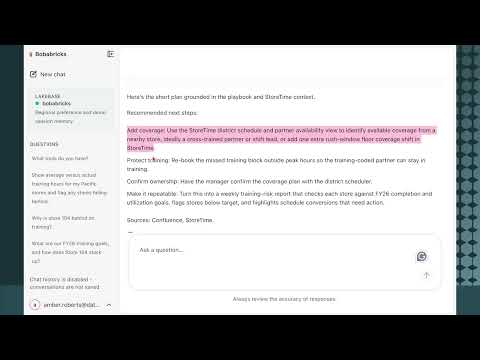
And what's really nice is it gives us a short plan taken out of the playbook that we added and using the store time MCP server for context. And so recommended next steps. It's like, well, you know, like add some coverage, get someone from another store, another district, add it on to that rush hour window where they need more floor coverage. You really want to protect training, so don't book training in the middle of peak hours, do it maybe early in the morning or in the afternoon.
And then here, this is interesting, make it repeatable, turn this into a weekly training risk report that checks on each store. So then I can now turn this into a weekly report so I can see how store 104 and even all the stores, see how they are doing before it gets to the end of the training period and we realize they haven't completed their training. Now going back to Databricks, I'm now going to go to my jobs and pipeline.
9:17 Automating agent tasks
I'm going to create a new job. And now we have the ability to create an agent as a task. So I can name this weekly report. I could put in the input, so summarize the high-level outcome of what this agent is responsible for, select the model, give specific instructions, rules to follow, tools, so I can add my different MCP servers, I can add my Boba Bricks store operations. I can add all those traces to specific table, and then any downstream tasks.
And I can save that task and make it repeatable, so every Monday morning I get an update of how that store is doing. Lastly, I want to go to AI Gateway and show how we're able to govern the capabilities of all the agentic workflows that you just saw. So, agent integrations, you saw I was using Codex. You can look at other featured models, and these are ones routed through Databricks. If you have a provider you want to add, like OpenAI, you can add that provider support here.
10:14 Governing AI capabilities
MCP servers, you saw I was using Atlassian. I can actually create policies if I have access to creating an Atlassian policy. So, if I, for example, want to create one on any unsafe content, I could select the guardrail type, so maybe this is unsafe content, maybe this is PII blocking, maybe this is a custom classifier, so I can put in the definition of what I want classified. And these can be for input guardrails before the model, output guardrails after the model, specific prompts.
Here, this is a set type, but again, if I wanted to do a custom one using LLM as judge, I can then put in that prompt and select the model for evaluation, and get that policy set. Going back to AI Gateway, in In for that governance around your MCP servers, we also have them for your agent capabilities as well. So in our usage capability dashboard, here we have the full overview of our agents. So if you're wanting to look beyond cost and want to look at the performance of the model, time to first token, tokens per minute, medium latency, the usage of the individual endpoints, how much individual users are leveraging those endpoints, looking at our coding agents, so looking at our Codex specifically, UC connections, UC MCP services, and then also cost analysis to see how much spend is being used.
And you might have seen at AI Gateway that we have budgets available. So if you are an admin, you have budget capability set. Here I can see these thresholds, and you just need to be an admin to create those budget capabilities. If I go and look at my admin view, here I can see where I can name the budget and create the scope. So I can create an OpenAI budget, apply it to a specific workspace, leverage Unity AI Gateway through the scope, create shared thresholds, so monthly thresholds, and I can either just send an alert or I can block that usage, or I can have per user thresholds, where I can set the monthly threshold, and again, either send an alert or block usage.
13:06 Demo summary and recap
All right. Now that wraps up the demo. Just a quick recap, we used the Agent Bricks agent development platform to give you choice, context, and control over the agent that we built. That agent was deployed on Databricks apps, which we were then able to debug and redeploy using Omnigen, and using it specifically with Codex. And throughout this entire workflow we were able to have that auditability, traceability, and governance because it was all provided through Unity AI Gateway.
Thanks everyone.
Learn more about the Databricks Data and AI platform.
The information provided herein is for general informational purposes only and may not reflect the most current product capabilities or configurations.