Databricks Data Sharing to Iceberg Clients with No Replication
Summary
- Apache Iceberg Interoperability: Databricks now shares Iceberg tables and views to compatible clients like Snowflake with no data replication needed.
- Live Data Access: Recipients query Databricks data directly through the Iceberg REST Catalog API, ensuring real-time accuracy and eliminating sync delays.
- Multi-Tool Support: Platforms including Snowflake, Trino, Flink, and Spark can all consume shared Iceberg data from Databricks Data and AI platform.
Databricks Data Sharing to Iceberg Clients with No Replication
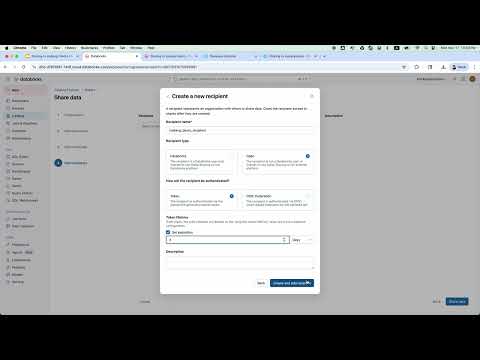
This video demonstrates how easily you can share tables and views to compatible tools, including Snowflake, using Databricks' Delta Sharing, the open protocol that allows seamless sharing across clouds and platforms. Delta sharing now securely supports sharing data and live from Databricks to any client that supports the Apache Iceberg™ REST Catalog API, with no data replication needed.
Chapters
0:00Introduction to data sharing0:36Creating provider assets1:28Configuring the data share2:28Recipient setup in Snowflake3:23Querying live data
FAQs
How do I enable Iceberg data sharing from Databricks?
This video shows creating tables with uniform enabled, adding them to a Delta Share, creating recipients, and generating platform-specific SQL (like for Snowflake) for recipients to set up access.
Can Snowflake access live Databricks data?
Yes. Recipients in Snowflake get secure, live access to shared tables and views through the Iceberg REST Catalog API. There's no data movement or copying.
Can Snowflake, Trino, or Flink write to Iceberg tables in Unity Catalog?
This video demonstrates data sharing from Databricks to compatible tools using Delta Sharing and the Apache Iceberg REST Catalog API. Recipients including Snowflake, Trino, and Flink get secure, live access to shared tables and views with no data replication. While this video focuses on read access through the REST API, the open protocol enables external platforms to query Iceberg tables in Unity Catalog.
Unity Catalog REST API and Iceberg REST catalog compatibility
This video shows how Databricks shares Iceberg tables through the open REST Catalog API, enabling Snowflake, Trino, Flink, and Spark to consume data without copying. Recipients authenticate with credentials, create catalog links, and query live data—demonstrating full Iceberg REST catalog compatibility for cross-platform data access.
How to share data applications securely across teams
This video demonstrates Delta Sharing's secure approach: data providers create shares with specific tables/views, recipients download credentials, and platforms like Snowflake authenticate and access live data through Iceberg REST APIs. No data leaves Databricks—recipients always see current data and automatically inherit any updates, enabling secure cross-team data collaboration.
Full transcript
0:00 Introduction to data sharing
Hello, I am Chinha from the datab bricks data sharing team. Data sharing now supports sharing data to compatible tools including Snowflake. You can now share data securely and live from data bricks to any client that supports the Apache as rest catalog API with no data replication needed. Platforms such as Snowflake, Trino, Flink, and Spark can utilize it. Today I want to show you how easy it is to share data securely from data bricks to any external platform in this case snowflake leveraging it as per client capabilities.
Let's begin from the viewpoint of the provider who intends to create and share uniform enabled tables and views with the recipient. Let's go to Unity catalog. I have precreated this asber demo catalog and schema one to create a uniform enabled table. The provider will use the create a table statement with proper table properties. For example, I have created the script to create a couple of tables T1, T2 and the view V view1 based on T1.
0:36 Creating provider assets
Let's run it now. As you can see, I enabled uniform when creating the tables and I inserted 20 rows to table T1 for demo purpose. Create creation completed. Let's back to catalog. You can see T1, T2, V1 are created. Now let's securely share them. We move to the dat sharing section. Remember data sharing is the open protocol that allows seamlessly sharing across class and platforms. Let's config the sharing settings in Unity catalog.
1:28 Configuring the data share
Let's name the share iceberg demo share. Let's add the tables and the views just created. Let's create a new recipient. Let's name it Asber demo recipient share data. There you go. It's very simple to set up the share. Now let's switch has to the recipient side. Someone receiving this shared tables and views. We support multiple asper clients. I will use Snowflake for today's demo. First, we need to download the credential file from the activation link.
2:28 Recipient setup in Snowflake
The bricks provides a way to generate SQL if needed for the client platform. Since we are using Snowflake as our Esper client, I will click the Snowflake button. Upload the credential file. Just download it. Select the share. Click generate SQL. Alternatively, you can also directly download SQL. Finally, let's see this live data in Snowflake. I will open a new Snowflake worksheet. Snowflake recipients get secure live access to the source data.
3:23 Querying live data
There's no data movement or copying. We can create a new notebook to execute SQL. Now let's create a catalog and create a catalog link database. Let's copy the code snippet. Replace the catalog name with a valid catalog name. Let's name it less demo. then run the command. As you can see the generated SQL already config the catalog URI and build token. And just like that, we now have a secure live access to the shared tables.
We can confirm this by browsing the catalog tab in snowflake. There is new database as programm database. Inside we can find schema one and table t1 t2 view one. For each table we can view the columns information and data preview. More importantly we can query it directly in a snowflake worksheet. Let's create a simple query and see how it works. I have precreated a simple query. Let's run it. The data is returned correctly.
That's all I have for the demo. To summarize, this demo shows how easily we can share tables and views to the asper clients. No data movement or replication needed. Thank you for watching the demo.
Learn more about the Databricks Data and AI platform.
The information provided herein is for general informational purposes only and may not reflect the most current product capabilities or configurations.