Bringing Data Intelligence to the Microsoft Ecosystem with Agent Bricks + Agent 365
Summary
- Agent 365 and Databricks integration: Agent 365 agents retrieve data and insights directly from Unity Catalog with automatic governance tracing.
- Genie in Microsoft 365: Databricks Genie now works with Agent 365, enabling natural-language questions about OneLake, SAP ERP, and other unified data.
- Enterprise governance and security: Each agent has an Entra ID identity and operates under Microsoft Purview and Defender controls for traceability.
Bringing Data Intelligence to the Microsoft Ecosystem with Agent Bricks + Agent 365
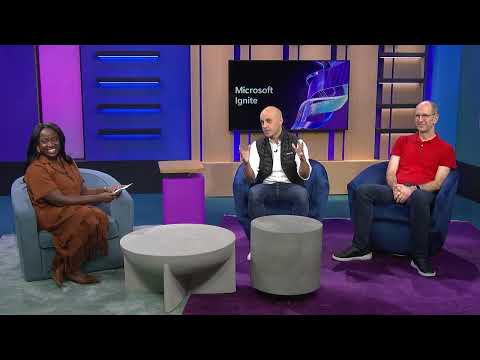
Databricks CEO, Ali Ghodsi, and Microsoft EVP, Cloud and AI, Scott Guthrie, explain a new way to connect governed data and AI inside Microsoft 365 during the partner keynote at Microsoft Ignite 2025.
How It Works
Agent 365 provides a secure environment for first-party and third-party agents to collaborate with users across Microsoft 365. Each agent has an Entra ID identity and operates under your organization’s existing Microsoft Purview and Defender controls.
When connected to Azure Databricks, a Databricks Agent can retrieve data and insights directly from Unity Catalog. It can summarize metrics and even provide reasoning behind its answers. Every interaction respects enterprise governance and is traceable back to the original data source.
For users, it feels like working with a knowledgeable teammate who always has access to the most current, trustworthy data.
To learn more, read the announcement blog: https://www.databricks.com/blog/bring-data-intelligence-microsoft-ecosystem-agent-bricks-agent-365
Chapters
0:00<Untitled Chapter 1>0:20Agent365 + Databricks Genie1:00Demo: Databricks Unity Catalog to centrally govern your data1:30Demo: SAP ERP data also centrally governed in Unity Catalog1:55Demo: Ask questions about your data with Databricks Genie
FAQs
How does Agent 365 connect to Databricks data?
Databricks Agents in Agent 365 can retrieve data directly from Unity Catalog, which centrally governs data from Databricks, OneLake, SAP ERP, and other sources.
What is Genie in the context of Agent 365?
Genie is Databricks' AI agent that integrates with Agent 365, allowing users to ask natural-language questions about business data and get answers with summarized metrics and reasoning.
How does governance work in the Agent 365 and Databricks integration?
Each agent has an Entra ID identity and operates under Microsoft Purview and Defender controls. Every interaction is traceable back to the original data source in Unity Catalog.
What data sources can Agent 365 access through Databricks?
Agent 365 can access data from Databricks, OneLake (Microsoft's data lake), SAP ERP, and other sources as long as they are centrally governed in Unity Catalog.
Full transcript
0:00 <Untitled Chapter 1>
The other big announcement is around the work we're doing around agents. And so um that ability again with all the announcements we're doing this week around Microsoft 365 copilot um uh agent 365 and all the work we're doing around governance >> right >> uh now will work with uh data bicks genie uh which is data bicks's AI agent and that ability to kind of have agents compose with agents >> to solve real world problems I think is what every organization's looking for and it really unlocks a tremendous amount of value.
0:20 Agent365 + Databricks Genie
Yeah. And I think what I'm hearing from you too is that you all are listening to the customer. You're giving the customer what they want, also what they need, right? Which is super important. So Ali, talk to me a little bit about how this all comes together, right? What is the product experiences that customers can have from this? And then what can you show us here? >> Yeah, I mean honestly more than me talking about it, maybe we should just uh look at the demo. >> Take us through.
Yeah. >> Yeah. So um Okay. So if if uh if we next look at the screen here uh so what we're looking at here is uni catalog okay >> which is a central place where you set up all the governance of Azure data bricks so you know you can have all your data there uh all of your models um all of your unstructured data but what we're doing now here is that we've actually set up you can see here we're clicking on one lake and one lake is now seamlessly available zero copy mirrored in uh and you can see it in uni catalog we also have uh SAP uh Azure data bricks here.
1:00 Demo: Databricks Unity Catalog to centrally govern your data
So we can see actually data that we have from SAP could be ERP data that you have and it's uh stored here. >> Uh so okay so we've set up all our data in uni catalog we've governed it we have access to one lake data we have access to SAP data. So next um >> uh let's start uh asking some questions from this data. >> Okay. >> Okay. So uh what we're going to do next uh is that we're going to go in and this is Genie. So, Genie lets you now select tables that you have in Unity catalog.
1:30 Demo: SAP ERP data also centrally governed in Unity Catalog
So, it could be in one lake, it could be uh in SAP. Okay. And you can start asking questions in English from the data. So, I'm just going to select one of these that's there and we're going to ask question about this VAT receipts here. Uh but what's really interesting about it is it now actually will construct queries for you as if it was an analyst and it will give you the answers without hallucinating. So, you can see here uh it's giving you the dollar amounts.
1:55 Demo: Ask questions about your data with Databricks Genie
Now the great thing is you can always bring in a subject matter expert that can look at the query if you want and it can edit the query and they can make sure that query that there are no errors in it and if they fix it it'll remember it and it'll get smarter over time right >> uh you can of course click here you can see it's actually extracted all these English descriptions about all the information that you have in uni catalog uh so it's use generative AI to describe that uh and you can of course go and add your own instructions in English if you want to make the room smarter >> so you can add more sort of uh things that you know you think can guide it Yeah, we like smarter. >> Yeah.
So that's so that's that's Genie. And now we we have we have Genie there. We can ask questions about it in English. >> But what if we also have a bunch of unstructured data. So here we're going to build an agent next uh in um agent bricks. So this is a knowledge assistant that's running on one leg you can see. And um inside of it we can set it up uh and configure it so it has access to these CFO notes and some financial documents.
And we can debug it here on the right. So you can see how it would be if we ask it in English questions. >> Um it can now actually go and uh interrogate that unstructured data. Uh it thinks through it. It comes up with a plan and then of course gives you the answers. >> But the nice thing about the answers that it gives you is that you can actually get receipts. You can actually see where did it get exactly this information from >> and you can start iterating on that quality.
So we can see here it's extracted information from these PDFs. Um and the best part of this is that you can actually now give it instructions uh to tune it uh so that it gets uh smart over time, >> right? >> Okay. So that's just now we have these we have you know two ways of asking questions. Let's say we want to put together a multi- aent system. So let's say we want to string together >> uh multiple of these agents.
So this is a multi-agent supervisor that we're looking at here. >> So um we have our unstructured data, we have our structured data at the bottom. Also we're giving the access to just search. So we're giving it MCP server that it can actually just go off to and do web search on. >> Uh so now you have an agent uh that can both interrogate the structured data, >> you know, generating SQL queries for you automatically unstructured data and if there's something it doesn't know, it can actually go off to the web and uh search the web uh for that information.
So let's give it a try. So we ask a question again in English. uh but now the multi- aent supervisor will figure out a strategy and see where can it best find this information uh out of these three sort of agents that we've given it. So you can see here >> this shows you actually the queries that it's going to make so that we can actually debug them again and making sure that they're doing it the right way >> right >> and if the answers are not what we want uh we can actually uh go ahead uh and look at how we actually receive those.
So let's look at the traces and you can see the details of the traces, all the agents that were called, all the invocations. You can actually debug them uh and make sure that they're uh doing it the right way. You can look at the timeline here on the x-axis. You can see how long it took. >> And if there's something that took too long, uh you can fix that um and make the agent um just, you know, perfect for that use case that you have. >> Uh so that's how this works.
But what I'm really excited about is here when we put it all together inside Microsoft Next. >> So what we've done now is we take we put it inside Copilot Studio and we actually integrated into Teams. So we should be able to now ask all of these agents directly in teams the questions that we have and it'll actually go through again governed by Unity catalog ensuring the correctness that we just iterated through and it can do that for you.
But the best part of that, all of this available right now, but what's coming next is that you'll be able to actually take these agents and put them in agent 365. And that way you can have digital co-workers inside office >> that you can actually talk to and they're routing your questions to the right agent for the right job. uh and it'll just be available there for you.
Learn more about the Databricks Data and AI platform.
The information provided herein is for general informational purposes only and may not reflect the most current product capabilities or configurations.