Automatic Publishing to Power BI with Databricks Workflows
Summary
- Automated Publishing: The Power BI task in Databricks Workflows publishes semantic models directly from your data pipelines to Power BI.
- Governance Integration: Unity Catalog applies row-level access policies, ensuring teams only see data they're authorized to access.
- Real-Time Updates: Jobs automatically publish data changes, eliminating manual steps and ensuring business users always have current insights.
Automatic Publishing to Power BI with Databricks Workflows
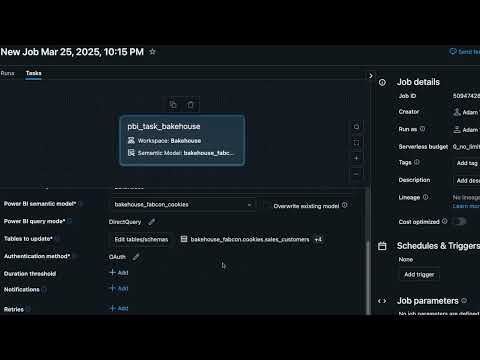
In this demo, we show how the Power BI task in Databricks Workflows automates publishing semantic models directly from your data pipelines to Power BI. This integration eliminates manual steps, ensuring business users always have access to current insights. The Power BI task reduces development time while providing real-time data updates for reports and dashboards.
Note: Databricks Lakeflow unifies Data Engineering with Lakeflow Connect, Lakeflow Spark Declarative Pipelines (previously known as DLT), and Lakeflow Jobs (previously known as Workflows).
Chapters
0:00Unity Catalog setup1:17Publishing to Power BI1:58Configuring the Power BI task5:06Job triggers and automation7:04Validation and conclusion
FAQs
How does the Power BI task automate publishing in Databricks Workflows?
The Power BI task publishes semantic models directly from your data pipelines to Power BI. This integration is built into Workflows as a new task type, allowing you to include publishing steps in your job definitions without manual intervention.
Can Unity Catalog enforce data access control when publishing to Power BI?
Yes. In this video, Unity Catalog applies row-level access policies (Aback policies) so that users in different regions see only the data they're authorized to access. For example, North American teams can only see North American data.
What are the benefits of using Power BI integration with Workflows?
The integration reduces development time, eliminates manual publishing steps, ensures real-time data updates for reports and dashboards, and allows you to include publishing as part of your core data pipelines rather than maintaining separate manual processes.
What was the status of the Power BI task in Databricks?
At the time of this video, the Power BI task was announced as a new feature in public preview for Databricks Jobs, starting that day.
Full transcript
0:00 Unity Catalog setup
So now that we've applied our Aback policies, let's jump back into Unity Catalog and figure out how we can get our data to PowerBI. So we'll go ahead and open the Unity catalog catalog explorer and we can go back to our bake house and uh bake house fabon catalog and cookie schema. So again within this schema we've applied a bunch of Aback policies so that we can uh basically enforce that folks in North America can only see North American data.
Um what we've also done is you know we did a little bit more modeling on our tables and we added some primary keys and foreign keys which is super cool. Um so if we go to our transactions table we can even see the relationships here inside of data bricks. Um this actually you know this is great from a a relation a table or data relationship perspective. It's super important not only for visualizing the you know relationships between our data sets uh but also for so that unity catalog has semantic understanding of our data.
So when we're using things like AIB genie or you know we're running uh DT pipelines uh there's a lot of uh you know goodies that are going on behind the scenes because Unity catalog understands your data and how it's interrelated. So back to the schema level. So we have our cookies data and we need to get this to PowerBI and you know right from within Unity catalog uh we can use this uh publish to PowerBI feature which would basically take our entire schema or some subset of tables and publish that to PowerBI um and you know it handles authentication can you can use different query modes works great it's great for ad hoc publishes and updates but part of me really wants to make this part of my core data pipelines uh and before today we couldn't but I'm really excited to share that data bricks jobs has a new PowerBI task type in public preview starting today so let's head over to jobs so we've got uh you know an existing retail analytics job what this does is basically aggregates all my my data together uh it's an incremental pipeline so it's grabbing CDC data from the source and then running incremental uh transformation so it's isolating that those transformations just to the net new records so it's super efficient and fast and it ultimately saves some money.
1:58 Configuring the Power BI task
Um, and then what we do normally is we would publish to PowerBI, but I'm going to show you what would happen if we um, you know, basically we're using this PowerBI task type. So, we'll create a new job and we'll name our job EBI task um, think. And what we'll do is we'll select from the list and we'll go to PowerBI. So, this is the new task. it auto selects the um the SQL warehouse that will be used either in import mode, dual storage mode or direct query.
Yes, this task supports all three. So you get all of the best of all worlds. Um, we'll select the PowerBI connection. And all this connection is is a new Unity catalog securable object that allows you to grant and revoke access to uh basically what maintains communication between data bricks and PowerBI uh so that we can publish uh semantic models on your behalf and make updates and all that fun stuff. Um then we'll select the PowerBI workspace bake house and then we will actually just publish a new semantic model. a house babcon cookies publish new semantic model.
Awesome. So this is going to be a brand new semantic model for the first run when we run this and then every time we run this after if there are changes updates uh you know if it's in import mode and needs to be refreshed datari jobs and this new task type takes care of all of that for you. Cool. So uh we're going to add our tables. So, we'll go to the cookies schema in Bankhouse Fabcon, and we'll just select a subset of these tables for now, but you know, there's some tables that might pop into the schema later that I might want to include in my model.
So, I can always select the select schema button, which basically lets me include uh future tables that are added or views or streaming tables and etc, etc. So, I'm going to go ahead go ahead and confirm. uh example, we're going to use direct query mode, but we could use import mode or dual storage mode. So, we can really take advantage of the full ecosystem in PowerBI. Um, and let's see, we're not going to overwrite an existing model, but what's great about this is you get all of the great capabilities in data bricks jobs.
So, you can set things like duration thresholds to, you know, prevent longrunning jobs. In this case, this is a very quick um you know, publishing task, but uh you know, if you wanted to set that, you could. You can set notifications to route to Teams or Slack or uh you know, a venue of your choosing. You can also set retries. So, if you know, for some reason there's a failure, as happens with data pipelines, um you can let data bricks jobs handle retrying it for you.
Yeah. And this is uh that's about it. There's, you know, just one more call out. We'll go ahead and save our task, but there's one more call out with data bricks jobs. Um, historically, most folks would probably schedule a job on some kind of temporal basis or um, you know, that could be a nightly, it could be once an hour, once every 30 minutes. Um, which is great when you know exactly when your data is arriving and that's all great and all fine and dandy, but what happens if you have sporadic data um, or data loading pipelines?
5:06 Job triggers and automation
Um so what's really neat is in data bricks jobs we still give you the option to use um temporal schedules or you know scheduling based on cron syntax. Um but we also give you the uh the ability to trigger based on file arrival. So this would be akin to you know a CSV or text file dropping in an ADLS gen 2 bucket or very soon you'll be able to schedule or trigger based on table updates. This is incredibly gamechanging because like I said before, we have this existing pipeline that's already fully incremental.
It's just isolating processing to the data that's coming in that's net new, transforming it scope down to just that net new data and basically we go and manually publish that to PowerBI today. Um, but with this PowerBI task type and this new table update trigger type, we can make sure that processing is incremental and that the pipeline runs only when it needs to. Ultimately, this saves you time, cost, uh, and is just much more efficient than before.
So, again, we could add tables. We can add any number of tables. We can set this to trigger when all tables are updated or only when some are updated. Uh, it's really, really neat. So, we're not going to set a trigger now, but we're going to run this manually right now. And what this will do is run super quickly. And at the end of the day, we will have a semantic model in PowerBI, which I will show you shortly. Awesome.
So, our job succeeded. We can open this in PowerBI. Once in PowerBI, we can view the semantic model. We can open the data model. And we can see that the relationships that we already had applied in Unity Catalog apply right here in PowerBI. That's awesome. Uh but what's even better is because we're using direct query mode, all of the Aback policies that we applied and the um you know the geosensitive uh data that we're filtering for the North America group, all of that is retained all the way through to the end, you know, to our end users.
7:04 Validation and conclusion
Um so if if those end users are in North America, they should only see North American data. Um so really cool stuff. Uh we have our semantic model in PowerBI. Um awesome. So just to recap, we uh we took our secured and governed data from Unity catalog and made it available to PowerBI through this new task type in data bricks jobs called the PowerBI task. And we can do this scoped to just when there are changes in our source data um or upstream tables or whatever we'd like.
The best part is this supports all open PowerBI query modes for full flexibility. It also supports overwrites. Um, you know what? So that could be changes to your source schema, your data, your relationships. All of that seamlessly gets reflected in PowerBI no matter what query mode you're using. So how awesome is that? I'm really, really excited to share that. Again, this PowerBI task in jobs in data bricks is available in public preview today.
Please give it a try and let us know what you
Learn more about the Databricks Data and AI platform.
The information provided herein is for general informational purposes only and may not reflect the most current product capabilities or configurations.